
Media and playlists
Upload images and videos. Arrange them in a playlist — a sequence of content shown on a screen. Update one screen or a whole group from your browser.
Update images and videos remotely. Schedule content for one screen or every location.
7 days free. No card needed.

This is the real dslite workspace with demo content. Build a playlist — a sequence of images and videos played on your screen. Then assign it to a screen and publish.
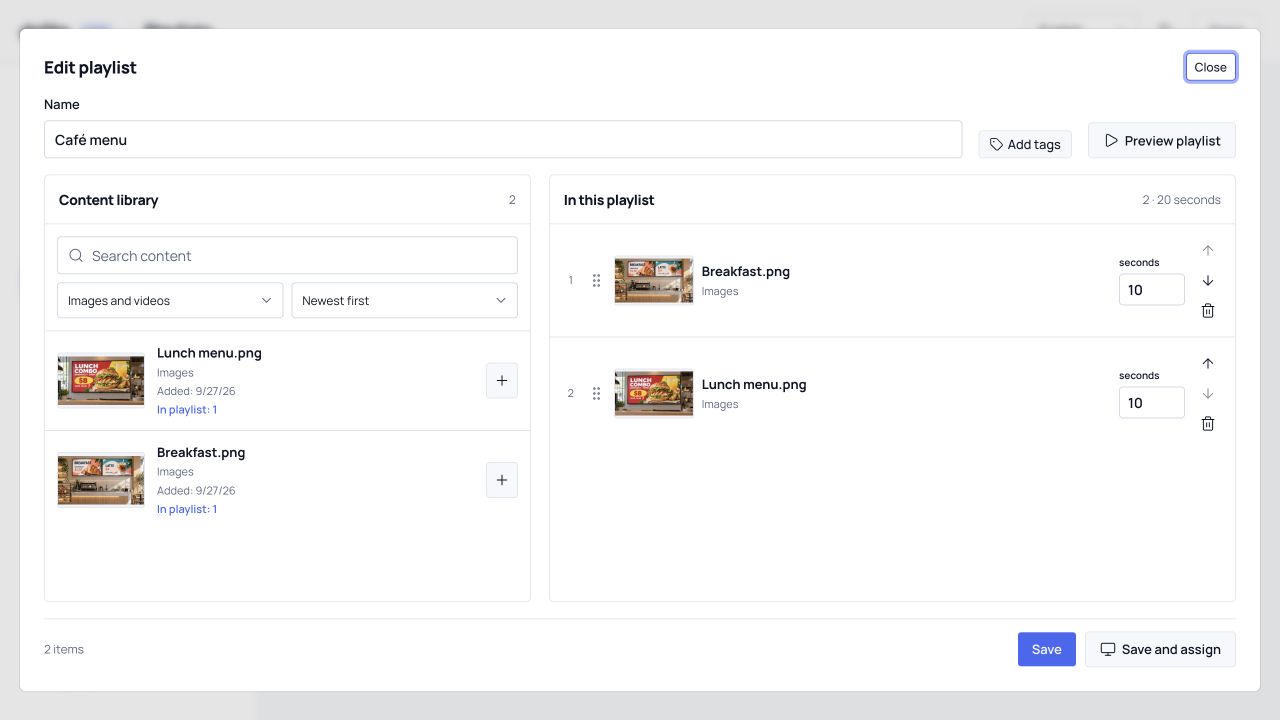
Upload ready-to-play images and videos.
Choose the order and duration of each item.
Assign the playlist to your screen and publish the update.
Upload images and videos. Arrange them in a playlist — a sequence of content shown on a screen. Update one screen or a whole group from your browser.

Breakfast menus in the morning. Offers for the weekend. Plan your content with shared schedules and let each screen follow its local time.

Downloaded images and videos keep playing if the connection drops. Screens switch to new content after the full update is ready.
7 days free. No card needed.
